
Get In Touch
Pudgy Squirrel Marketing
How Contractors Can Use CRM Software to Follow Up With Leads and Stop Losing Jobs to Competitors
By Tony
November 18, 2026
10 mins
Share:
The Follow-Up Problem That Is Costing Contractors Real Money
Here is a scenario that plays out in thousands of contracting businesses every week.
A homeowner finds your website, fills out the quote request form, and waits. You are on a job. Your crew foreman does not handle calls. The office does not check the form inbox until morning. By the time someone follows up, it has been 18 hours.
The homeowner hired someone else at hour six.
This is not a rare edge case. It is the default for most contracting businesses, and it is one of the most expensive operational problems in the industry. Research on lead response time consistently shows that contacting a new lead within the first five minutes produces dramatically higher conversion rates compared to waiting even 30 minutes. After an hour, the odds drop sharply. After 24 hours, most leads have moved on.
The problem is not that contractors do not care. It is that the follow-up process depends entirely on humans remembering to do things at the right moment, and humans are busy running jobs.
A CRM fixes this by removing human memory from the equation entirely.
What a CRM Actually Is (and What It Is Not)
Before getting into the how, it helps to clear up a common misconception.
A CRM is not a complicated enterprise software suite that requires a full-time administrator. It is not only for companies with large sales teams. And it is not a replacement for personal relationships with customers.
A CRM is simply a system that tracks your leads, organizes your pipeline, and automates the repetitive communication tasks that fall through the cracks when you are running a busy contracting operation.
At its core, a well-configured CRM for a contractor does four things:
- Captures leads from every source (your website, phone calls, social media, referrals) into one organized place
- Triggers automatic responses the moment a new lead comes in, so no one waits
- Tracks every lead’s status so you always know who needs a call, who is waiting on a proposal, and who is ready to book
- Sends follow-up sequences over days or weeks so cold leads get nurtured without any manual effort
That is it. The complexity can scale up as your business grows, but those four functions alone will produce a measurable improvement in how many leads you convert.
Why Contractors Specifically Need a CRM More Than Most Industries
Every industry can benefit from better lead management. But contractors face a specific set of conditions that make the problem especially acute.
You are not at a desk. A dentist’s office has a receptionist. A law firm has paralegals monitoring the inbox. When you are the owner-operator of a contracting company, you are on roofs, at job sites, in material suppliers, and in trucks. You are not available to respond to a web form submission within five minutes without a system doing it for you.
Your leads are high value and high competition. A single roofing job might be worth $12,000 to $25,000. Every lost lead is not a small missed sale. It is a significant revenue event. At the same time, homeowners often contact two or three contractors simultaneously. The first credible response often wins the conversation.
Seasonality creates feast-or-famine lead flow. Storm season, spring, and fall create surges in lead volume. Without a system, leads pile up and get missed. With a system, every lead gets an immediate response and enters an organized follow-up queue regardless of how many come in at once.
Referrals get mixed in with cold leads. Most contractors manage referrals, past customer callbacks, and new inbound leads through the same phone or email inbox. It is easy to lose track of where a conversation stands. A CRM gives every lead a record, a status, and a next action.
The 5 Core CRM Functions Every Contractor Should Be Using
1. Automated Instant Response
This is the single highest-impact CRM function for most contractors, and it requires zero ongoing effort once it is set up.
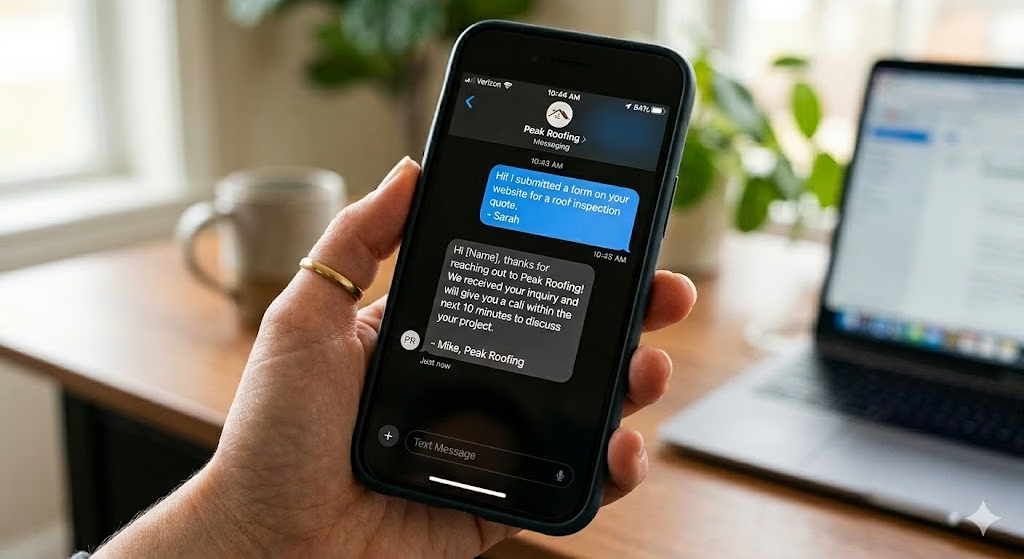
The moment a lead fills out your website form, your CRM sends an automatic text message and email within seconds. Not minutes. Seconds.
A strong instant response text looks like this:
“Hi [First Name], this is [Your Name] with [Company Name]. We just received your request for a [service] estimate. We will call you within [X] hours to schedule a visit. If you need to reach us sooner, just reply to this message or call [phone number].”
This single message does three things simultaneously. It confirms the lead was received (reducing anxiety and preventing them from moving on). It sets a timeline expectation. And it puts your name in front of them before any competitor does.
Pair this with a follow-up email that includes your Google review count, two or three photos of recent completed jobs, and your contractor license information. By the time you call, the homeowner already has a positive impression of your business.
2. Pipeline Organization by Stage
Most contractors track their leads in one of three ways: a notebook, a mental list, or a messy email inbox. All three systems have the same fatal flaw. They do not show you what needs to happen next.
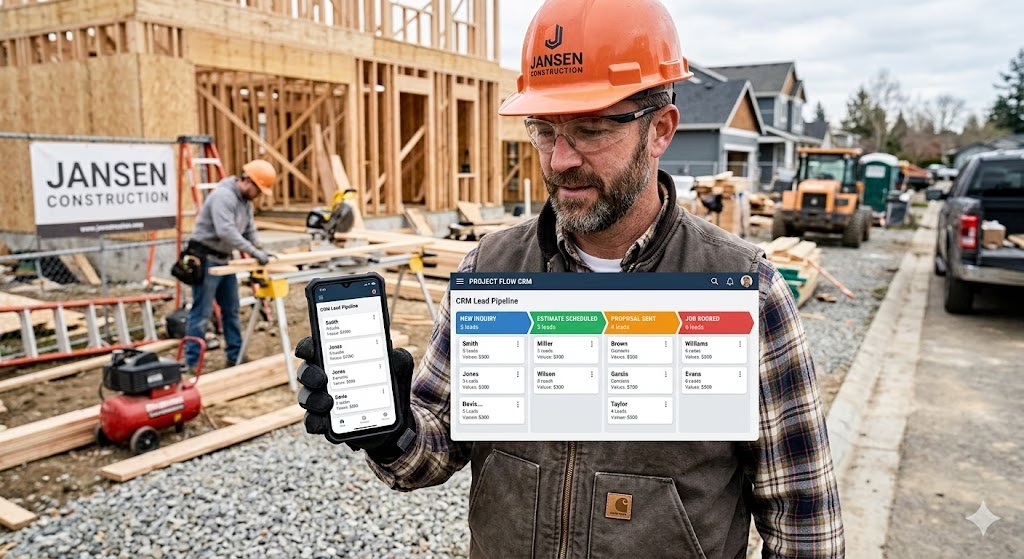
A CRM pipeline organizes every lead into a visual stage, typically displayed as a column board (often called a Kanban view). Common stages for a contracting business include:
- New Inquiry: Lead just came in, not yet contacted
- Contacted: First outreach made, waiting to schedule
- Estimate Scheduled: Site visit is on the calendar
- Proposal Sent: Quote has been delivered, waiting on decision
- Follow-Up Needed: No response to proposal, needs a nudge
- Job Booked: Won. Moving to production.
- Lost / Not a Fit: Closed without booking
Every lead lives in exactly one stage at all times. When you open your CRM in the morning, you are not trying to remember where each conversation stands. You look at the board, see every lead and its status at a glance, and know exactly who needs attention today.
This visibility alone prevents the “I forgot to follow up with that guy” scenario that costs contractors jobs every month.
3. Follow-Up Sequences That Run Automatically
Most contractors follow up once, maybe twice, and then stop. This leaves money on the table.
Research on B2C service purchase behavior consistently shows that buyers, especially for large-ticket items like construction projects, often need multiple touchpoints before making a decision. They are comparing options, talking to a spouse, waiting on an insurance adjuster, or simply busy. A single follow-up call that goes to voicemail does not mean the lead is dead.
A CRM follow-up sequence automates this process so leads are nurtured over days or weeks without requiring manual action.
A basic post-proposal sequence for a roofing or construction company might look like this:
- Day 0: Proposal delivered. Automated email: “Here is your estimate. Let me know if you have any questions.”
- Day 2: Automated text: “Just checking in to see if you had a chance to review the proposal. Happy to answer any questions or adjust the scope.”
- Day 5: Automated email: “We wanted to follow up one more time. Our schedule fills up quickly, especially heading into [season]. Would you like to get on the calendar?”
- Day 10: Reminder task created for a personal phone call from the owner
- Day 21: Final automated email: “We still have your project on file. Reach out anytime when you are ready to move forward.”
This sequence does not require you to remember any of these steps. The CRM executes them automatically based on the trigger date. You show up to make the personal call on day 10 because the CRM put it on your task list. Everything else runs without you.
4. Lead Source Tracking
Do you know which of your marketing channels is actually generating the leads that turn into booked jobs?
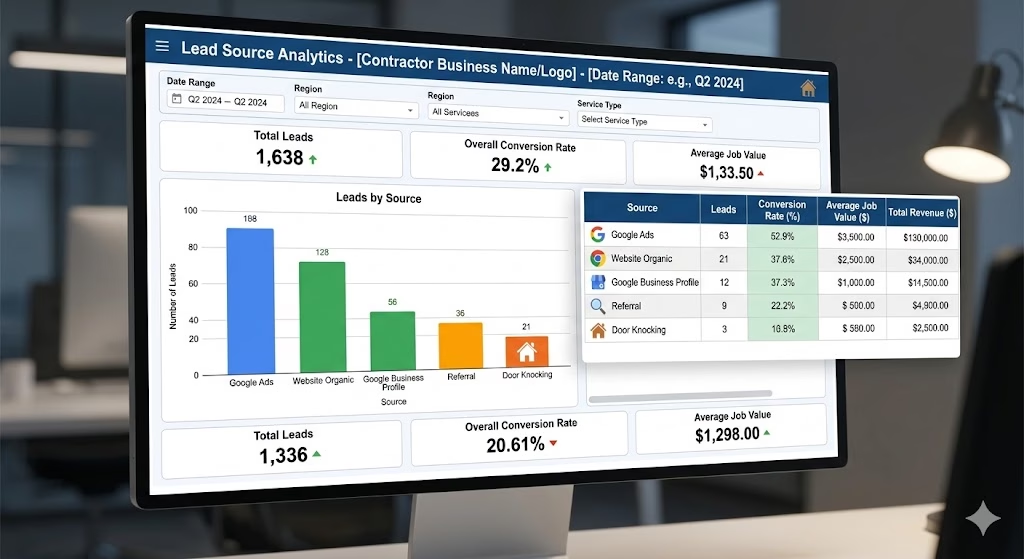
Most contractors have a rough sense that their Google ads are “doing something” or that they get a lot of referrals, but they cannot answer precisely. They do not know their cost per lead by channel, their close rate by source, or which marketing investment is producing the highest return.
A CRM solves this by tagging every lead with its source at the point of entry.
When you know that your Google Ads generate 40 leads per month at an average close rate of 28 percent, and your referral leads close at 62 percent, you can make intelligent decisions about where to allocate your marketing budget. Without that data, you are guessing.
Over time, this source tracking also reveals which channels produce your highest-value jobs, not just your highest volume. A channel that generates 10 leads per month at an average job value of $18,000 may be more valuable than one generating 25 leads at an average of $6,000, even if you are spending more on it.
5. Reactivation of Past Leads and Past Customers
Your CRM is not just for new leads. It is a database of every person who has ever expressed interest in your services, and that database has real revenue sitting in it.
Dormant leads: Most contractors abandon leads that did not convert immediately. But circumstances change. A homeowner who got three quotes last spring and went with a competitor may have had a bad experience. Their neighbor just got a new roof and now they feel the urgency again. A well-timed reactivation message costs you nothing to send and occasionally turns a six-month-old dead lead into a booked job.
A simple reactivation message sent to leads from the past 90 to 180 days: “Hi [Name], we worked on an estimate for you a few months back. Spring is filling up fast and we wanted to reach back out in case the timing is right now. Happy to revisit the proposal or schedule a fresh walkthrough.”
Past customers: Past customers are your warmest leads for repeat work, referrals, and reviews. A CRM can trigger a message 12 months after a job is complete: “It has been about a year since we replaced your roof. Just wanted to check in and make sure everything is holding up well. If you know anyone who needs roofing work, we always appreciate the referral.”
This kind of touchpoint costs almost nothing to send and produces referrals, repeat business, and Google reviews, all from people who already trust you.
Common CRM Mistakes Contractors Make (and How to Avoid Them)
Choosing a Generic CRM Not Built for Field Service
Tools like generic sales CRMs can be configured for contracting, but they require significant setup and often lack features that matter specifically to contractors, like job photos, estimate attachments, and mobile-first interfaces designed for field use. Look for a CRM built with construction and home service businesses in mind, or work with a marketing partner who can configure one specifically for your workflow.
Setting It Up and Never Logging Back In
A CRM is not a set-it-and-forget-it tool for the pipeline and task components. The automations can run without you. But the pipeline stages, task completion, and lead status updates require someone to maintain them. Assign this responsibility explicitly. Even 15 minutes at the start and end of each workday is enough to keep the system current.
Not Connecting It to Your Lead Sources
A CRM that only captures leads from one source misses half its value. Connect your website contact form, your Google Business Profile, your Facebook lead ads, and any other lead channels directly to your CRM so every inquiry enters the system automatically. Manual data entry is where leads fall through the cracks.
Sending Robotic, Impersonal Automated Messages
Automation does not mean cold. Your follow-up sequences should sound like a real person wrote them, because a real person should be writing them. Use first names. Reference the specific service they inquired about. Write in the same tone you use when you talk to customers in person. Homeowners can tell the difference between a genuine message and a template blast, and the ones that feel genuine convert at a much higher rate.
How CRM Fits Into a Larger Marketing System
A CRM solves the follow-up problem. But it relies on a consistent flow of quality leads to follow up with.
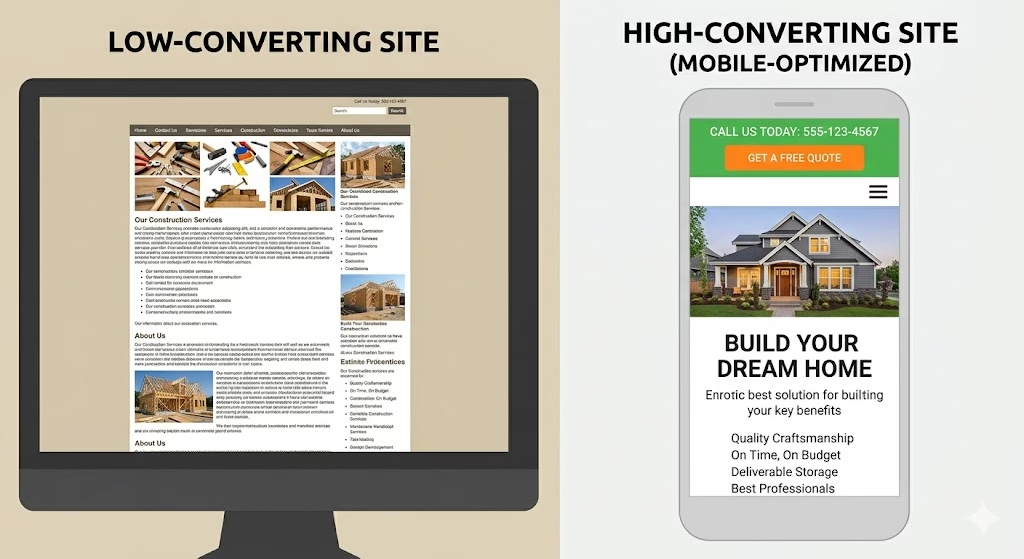
If your website is not converting visitors into inquiries, a CRM has nothing to work with. A high-converting website built specifically for construction lead generation is the front end of the system. The CRM is what happens the moment a lead comes through the door.
If your business is not showing up in Google search results for the services you offer in your area, visitors are not finding your website in the first place. A local SEO strategy built for contractors ensures that the people actively searching for what you do in your market can actually find you.
And if you are running Google Ads or other paid campaigns without a CRM behind them, you are paying to generate leads and then failing to capture the full return on that investment. Every ad dollar you spend should be supported by a follow-up system that converts those clicks into booked jobs.
These pieces are not separate decisions. They are one connected system, and a CRM solution built for roofing and construction businesses is the connective tissue that ties the whole thing together.
What to Look for in a CRM for Your Contracting Business
Not all CRMs are created equal, and the feature set that matters for a law firm or a software company is very different from what a roofing or construction company needs.
When evaluating CRM options, prioritize these capabilities:
- Mobile-first interface: You and your team are not at desks. The CRM must work fast and intuitively on a phone.
- Two-way text messaging: Email alone is not enough. SMS has dramatically higher open rates, and two-way texting allows homeowners to respond and continue the conversation.
- Automated workflows: The system should be able to trigger text messages, emails, and internal task notifications based on lead actions without any manual input.
- Pipeline customization: You should be able to create stages that match your actual sales process, not adapt your process to fit a rigid default structure.
- Form and website integration: New leads should flow in automatically from your website and any other lead sources.
- Reporting and analytics: Lead volume, close rate, revenue by source. If you cannot measure it, you cannot improve it.
- Review request automation: The ability to automatically send a review request to a customer after a job is marked complete is a high-value feature for local search rankings.
Your CRM Implementation Checklist
If you are starting from scratch or evaluating your current setup, use this list to make sure the foundations are in place.
Week 1: Setup
- Select a CRM platform appropriate for construction and home services
- Connect your website contact form to feed leads directly into the CRM
- Set up your pipeline stages to match your actual sales process
- Import any existing leads or customer contacts
Week 2: Automation
- Build your instant response text and email templates
- Configure a post-inquiry follow-up sequence (minimum 3 touchpoints over 10 days)
- Build a post-proposal follow-up sequence
- Set up a review request message triggered when a job is marked complete
Week 3: Team Adoption
- Train anyone who handles leads on how to update pipeline stages
- Establish a daily check-in habit (morning review of new leads, evening review of open tasks)
- Connect all lead sources (Google Ads, social, GBP) to feed into the CRM
Ongoing: Optimization
- Review close rate by lead source monthly
- Audit dormant leads quarterly for reactivation opportunities
- Send a past customer check-in campaign twice per year
Final Word
The contractors who consistently win in competitive markets are not always the most skilled tradespeople or the ones with the lowest prices. They are the ones who respond first, follow up consistently, and never let a good lead go cold because someone was busy.
A CRM makes that level of responsiveness possible without adding hours to your workday. It works while you work. It follows up while you sleep. And it keeps every lead organized so nothing falls through the cracks, even in the middle of your busiest storm season.
If you are ready to build a lead follow-up system that actually converts the marketing you are already doing into booked jobs, Pudgy Squirrel Marketing works exclusively with construction and roofing companies. We will help you set up, configure, and connect a CRM that fits your business and your workflow.
Why Schedule a Call?
Popular Insights
Why Most Construction Company Websites Don’t Generate Leads and Exactly How to Fix Yours
Nov. 11, 2026
Google Business Profile for Roofers: The Complete Setup and Optimization Guide to Dominate Local Search
Nov. 03, 2026
Storm Season Marketing for Roofers: How to Get More Calls in the 72 Hours After a Major Hail Event
Oct. 27, 2026
What a Roofing Company’s Website Needs to Convert Visitors Into Booked Estimates (With Examples)
Oct. 20, 2026
How Roofers Get More Leads in the Off-Season: A Practical Marketing Playbook for Slow Months
Oct. 13, 2026Topics
Pudgy Squirrel Marketing
How Contractors Can Use CRM Software to Follow Up With Leads and Stop Losing Jobs to Competitors
Read More
Pudgy Squirrel Marketing
Why Most Construction Company Websites Don’t Generate Leads and Exactly How to Fix Yours
Read More
Pudgy Squirrel Marketing
Google Business Profile for Roofers: The Complete Setup and Optimization Guide to Dominate Local Search
Read More
Pudgy Squirrel Marketing
Storm Season Marketing for Roofers: How to Get More Calls in the 72 Hours After a Major Hail Event
Read More
Pudgy Squirrel Marketing
What a Roofing Company’s Website Needs to Convert Visitors Into Booked Estimates (With Examples)
Read More
Pudgy Squirrel Marketing
How Roofers Get More Leads in the Off-Season: A Practical Marketing Playbook for Slow Months
Read More
Pudgy Squirrel Marketing
How to Build a Referral Program for Your Roofing or Construction Business (Without Spending a Fortune)
Read More
Pudgy Squirrel Marketing
The Amish and Plain Community Business Owner’s Guide to Online Marketing
Read More