
Get In Touch
Pudgy Squirrel Marketing
How to Use Video to Book More Jobs as a Roofer or Builder (Even If You Hate Being on Camera)
By Tony
July 31, 2026
14 mins
Share:
Key Takeaways
- Video is the highest-performing content format on every major platform a contractor’s customers use Facebook, Instagram, YouTube, and Google but most contractors skip it entirely because they assume it requires professional production or on-camera comfort.
- The video content that generates the most leads for contractors is almost never polished or scripted. It’s authentic, job-site footage that shows real work, real process, and real results.
- You don’t have to appear on camera to produce effective contractor video content. Time-lapses, project walkthroughs, drone footage, and narrated process videos all perform well without requiring a face on screen.
- A 60-second phone video of a completed project, posted natively to Facebook or as an Instagram Reel, consistently outperforms static photos in reach, engagement, and lead generation for contractor businesses.
- Short-form video (under 60 seconds) and longer educational video (5–10 minutes on YouTube) serve different functions in your marketing both have a role, and neither requires being a skilled presenter.
- Video content compounds over time. A YouTube library of 30 project and educational videos generates leads months and years after the videos are published unlike paid ads that stop the moment the budget does.
The Video Excuse Most Contractors Make
Ask a contractor why they’re not using video in their marketing and you’ll get some version of the same answer:
“I’m not good on camera.” “I don’t have the time to produce videos.” “That’s for bigger companies.” “I wouldn’t even know where to start.”
All of these feel legitimate. None of them are actually the barrier.
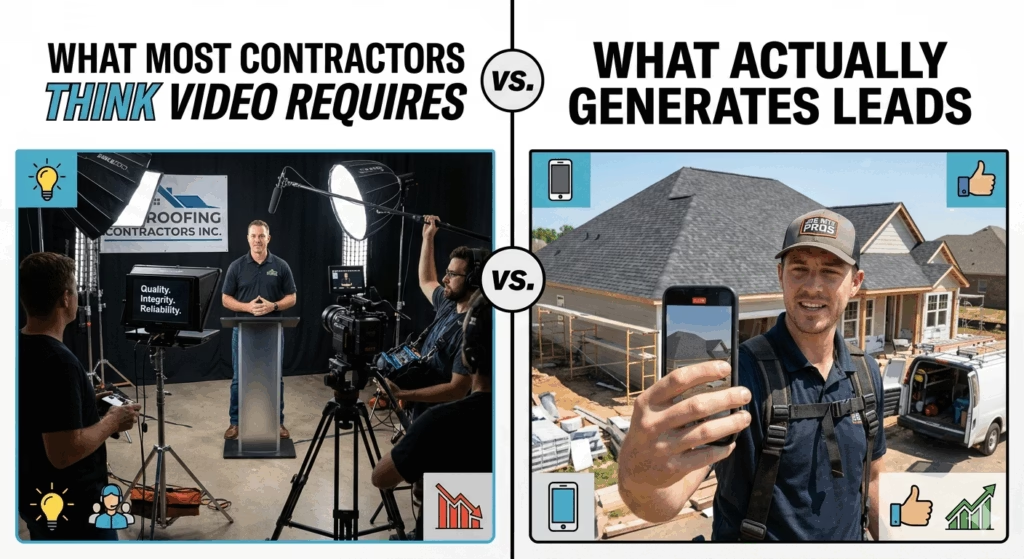
The real barrier is a mental image of what contractor video marketing looks like professionally edited production with scripted segments, drone footage transitions, branded lower-thirds, and a confident presenter explaining services directly to camera.
That type of video exists. It can be effective. It’s also entirely unnecessary for the kind of video that actually books roofing and construction jobs.
The highest-performing contractor video content on Facebook and Instagram right now is raw. It’s a 45-second phone recording of a crew installing ridge cap on a sunny morning in someone’s neighborhood. It’s a two-minute walkthrough of a deck build from framing to finish. It’s a time-lapse of a full roof tear-off and replacement compressed to 60 seconds with no narration.
Nobody in those videos is performing. Nobody is looking at camera and saying “Hi, I’m [name] from [company] and today I want to talk to you about the importance of proper ventilation.” They’re just doing the work and that authenticity is exactly what makes it perform.
This post shows you exactly what to shoot, how to shoot it, where to post it, and how to turn job-site footage you’re already walking past every day into a lead-generating video library that works whether you’re on the roof or not.
Why Video Works So Well for Contractor Marketing Specifically
Before diving into the how, it’s worth understanding the why because the reasons video works so powerfully for contractors are specific to the trade, not generic marketing logic.
It Shows the Work, Not Just Describes It
A written testimonial says “they did a great job.” A video shows the finished product, the clean job site, the smiling homeowner, and the before condition for context. The difference in persuasive impact is enormous.
Construction is a visual trade. The output is something you can see, walk across, live under. Video is the native medium for that output.
It Builds Familiarity Before the First Call
A homeowner who has watched three of your videos before they call you doesn’t feel like they’re calling a stranger. They’ve seen your crew. They’ve heard your voice (if you narrate). They’ve watched how you handle a tricky flashing detail or a soft spot in a deck. By the time they pick up the phone, you’ve already demonstrated competence and built some level of trust.
This pre-call familiarity dramatically reduces the sales friction in the estimate conversation. The buyer isn’t evaluating whether to trust you from scratch they’ve already started.
It Demonstrates Expertise Without Claiming It
There’s a meaningful difference between a contractor who says “we’re experienced experts” and one who posts a video explaining why their crew installs ice and water shield two feet past the wall line in cold climates.
The first is a claim. The second is proof.
Video allows you to demonstrate expertise through process, through decision-making narration, through the details you attend to on a job site without making a single self-promotional statement. The expertise is visible. It doesn’t need to be asserted.
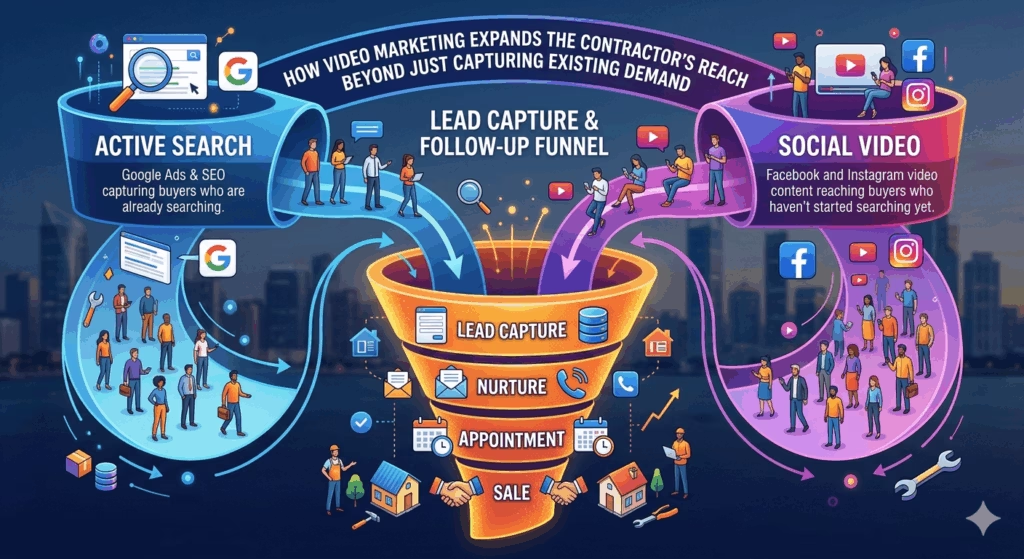
It Reaches Local Buyers Who Haven’t Started Searching Yet
SEO and Google Ads capture buyers who are already searching for your service. Video on Facebook and Instagram reaches buyers who haven’t started that search but who live in your service area, own homes, and are one compelling piece of content away from deciding that deck they’ve been putting off is finally happening this spring.
This demand-creation function is unique to social content. And video is the format that performs it most effectively.
The 5 Video Formats That Book Jobs for Contractors
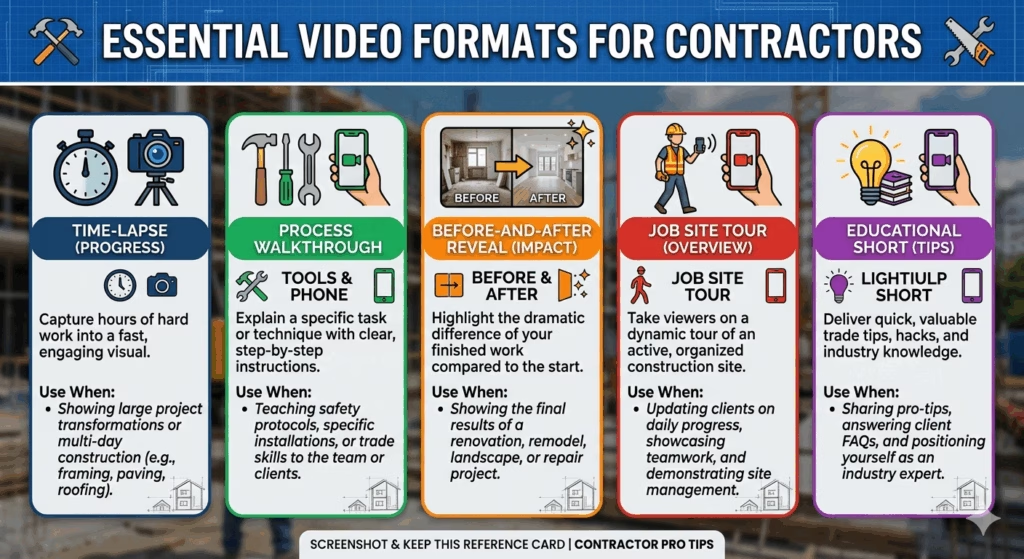
You don’t need an idea factory to produce contractor video content. These five formats cover the full range of what works and you can rotate through them indefinitely using the work you’re already doing.
Format 1: The Project Time-Lapse
What it is: A compressed video of a project from start to finish a full day or a multi-day build condensed to 60–120 seconds.
Why it works: Time-lapses are inherently watchable. There’s something satisfying about watching a bare deck frame become a finished outdoor living space in under two minutes. The format is engaging even to viewers with no particular interest in contracting which means it gets shared and reaches audiences beyond your existing followers.
How to shoot it:
- Set your phone on a stable surface or a small tripod with a clear view of the work area
- Use your phone’s built-in time-lapse mode
- Let it run for 2–6 hours (the phone captures a frame every few seconds and compresses automatically)
- Check the angle at the start and after the first 30 minutes to ensure it hasn’t shifted
No editing required. The time-lapse mode handles compression automatically. Upload the finished file directly to Facebook, Instagram, or YouTube.
Caption formula: “Watch this [project type] transform from [before description] to finished product in 90 seconds. This project in [neighborhood/city] took our crew [X days] here’s the highlight reel.”
Best platforms: Facebook (posts and Reels), Instagram (Reels), YouTube Shorts.
Format 2: The Process Walkthrough
What it is: A 60–90 second narrated or narration-free video walking the viewer through a specific step in a project a technique, a material application, a quality check.
Why it works: Process videos establish expertise without claiming it. A roofer who shows how they inspect and address a soft spot in the decking before re-sheating is demonstrating the thoroughness that buyers can’t easily evaluate until after the job is done. Video makes that evaluation possible before the sale.
How to shoot it:
Option A (narrated): Hold the phone pointed at the work, and talk through what you’re doing in plain language while the crew works. “This is the valley we found when we pulled the old shingles you can see the original flashing was installed over the shingles instead of under them, which is what caused the leak. Here’s how we’re addressing it…”
Option B (narration-free): Shoot the technique or process without commentary. Let the work speak. Add a text overlay or caption that explains what’s happening.
You don’t need to appear on camera. The phone is pointed at the work, not at you.
Best for: Instagram Reels, Facebook video posts, YouTube as part of a “How We Work” series.
Format 3: The Before-and-After Reveal
What it is: A structured video showing the project before work began, optionally showing one or two mid-project shots, then revealing the finished result.
Why it works: The before-and-after reveal is the single most emotionally satisfying content format for home improvement content. It triggers aspiration in every viewer who sees a problem that matches something in their own home or yard and it implicitly answers the most important buyer question: can this company produce a dramatic, visible improvement?
How to shoot it:
- Film a slow pan of the “before” condition narrate briefly what the problem is if comfortable, or just let the footage show it
- Optionally capture a brief mid-project shot (framing, rough structure, material installation)
- Film the completed “after” from the same angle as the before
- Edit in your phone’s native editor: put the clips in sequence, add a transition if you like, done
For the dramatic effect: Pause on the before shot for three to four seconds, cut to the after, and let the contrast do the work. No music or text overlays required though both can add polish if you want to invest two extra minutes.
Best for: Facebook posts and Reels, Instagram Reels, YouTube.
Format 4: The Job Site Tour
What it is: A casual, one-take video filmed during or at the end of a job walking around the site, showing the work completed, occasionally talking to camera or simply narrating while pointing.
Why it works: Job site tours are authentic in a way that produced content almost never is. The imperfect lighting, the ambient job site sounds, the casual hand-off between shots all of it signals to the viewer that this is real. Real is trustworthy.
How to shoot it:
Walk the site at the end of the day or at job completion. Film with your arm extended, pan slowly to show context and detail. Narrate casually:
“Wrapping up day two of this project in [neighborhood]. We’ve got the deck framing done and the ledger board properly flashed you can see here how we made sure to get the proper clearance from the siding before we went up with the beam…”
Total time to shoot: 3–5 minutes. No editing needed. Post as-is.
The on-camera question: This format works with or without your face on camera. If you’re comfortable with a brief intro “Hey, [Your Name] here from [Company], walking you through what we’ve been up to this week in [city]” it adds personality and builds stronger viewer connection. If you’re not, pointing the camera at the work and narrating from off-screen works just as well.
Best for: Facebook (very high engagement format for local contractor audiences), Instagram Reels, LinkedIn if you serve commercial clients.
Format 5: The “Did You Know” Educational Short
What it is: A 30–60 second video sharing a specific piece of technical knowledge that helps homeowners make better decisions about a project delivered informally, without a script.
Why it works: Educational video content establishes topical authority in a way that positions you as the expert who genuinely wants buyers to make informed decisions, rather than the salesperson who wants to close at any cost. This positioning converts at significantly higher rates in the estimate conversation because trust is pre-established.
How to shoot it:
Pick one thing you know that most homeowners don’t one decision point, one quality indicator, one mistake that commonly happens with inferior installations.
Stand near relevant work or material, hold the phone, and explain it in under 60 seconds:
“Quick tip before you hire any roofing contractor: ask them how many nails per shingle they’re installing. Code minimum in most areas is four. High-wind areas and any roof over a 4/12 pitch should have six. If they can’t answer that question or tell you it doesn’t matter, that’s a signal worth paying attention to.”
That video: took three minutes to record, establishes genuine expertise, answers a pre-sale question that reduces friction, and reaches buyers who are in the research phase of their decision.
You don’t need to be a natural presenter. One take, plain language, direct to the point. Imperfect delivery is fine. Authentic, specific information is what matters.
Best for: YouTube (searchable and long shelf life), Facebook, Instagram Reels, TikTok if your audience skews younger.
Where to Post Contractor Videos (And What Each Platform Does)
The same video posted to different platforms does different jobs in your marketing system. Understanding the function of each platform helps you deploy the right content in the right place.
Facebook: Local Reach and Referral Generation
Facebook remains the highest-performing video platform for local contractor marketing. Its algorithm actively promotes video to local audiences, and the sharing mechanics mean that a video your followers engage with often reaches their entire friend network many of whom are neighbors and community members.
Best video types for Facebook: Before-and-after reveals, job site tours, time-lapses, short educational content.
Posting tips:
- Upload videos natively to Facebook (not as YouTube links). Native uploads get significantly more organic reach than linked videos.
- Write a caption of three to five sentences that provides context and ends with a soft CTA: “If your [roof/deck/shed] has been on your list, we’re booking estimates for [season] now comment below or send us a message.”
- Tag the location of the project.
- Post when your audience is most active typically Tuesday through Thursday between 7–9 AM or 5–8 PM.
Instagram Reels: Discovery and Brand Building
Instagram’s Reels algorithm surfaces content to users who don’t follow you making it the highest organic discovery channel available to contractors who aren’t already running paid ads.
A well-produced Reel (even “well-produced” in the minimal sense of good light and a steady shot) has a genuine chance of reaching hundreds or thousands of local homeowners who have never heard of your company.
Best video types for Instagram Reels: Time-lapses, before-and-after reveals, short educational tips. Vertical format, under 90 seconds.
Posting tips:
- Use trending audio when possible (Instagram’s algorithm rewards Reels that use popular audio)
- Add text overlays summarizing what’s happening (many users watch without sound)
- Use location hashtags and geo-tags to ensure local relevance
- Your Reel caption matters less than on Facebook lead with the first line, which appears in the preview
YouTube: Long-Term Search and Authority Building
YouTube functions differently from social platforms. It’s a search engine for video and a video published on YouTube today can generate views and leads for years.
A YouTube library of 20–30 contractor videos project tours, how-we-work content, educational tips, service area spotlights compounds over time into a significant source of organic discovery that no other platform replicates.
Best video types for YouTube: Longer project walkthroughs (3–10 minutes), in-depth educational content (“How to Know If You Need a New Roof”), service-specific content (“What Does Metal Roof Installation Actually Look Like?”), seasonal content (“Getting Your Roof Ready for Winter”).
Posting tips:
- Title every video as a search query the buyer would actually type: “How Much Does a Deck Replacement Cost in [City]?” not “Project Update Week 4.”
- Write a full description (200–400 words) that includes your service area, services offered, and the content of the video.
- Include your website URL and phone number in the first three lines of the description.
- Create a custom thumbnail using Canva a thumbnail with a clear before-and-after or a face looking at camera significantly increases click-through rate compared to a default screenshot.
A strong YouTube presence pairs naturally with a robust SEO strategy for construction and roofing businesses YouTube videos often appear in Google search results alongside blog posts and web pages, giving your business a second position on the same search results page.
Google Business Profile: The Underused Video Channel
Almost no contractors post videos to their Google Business Profile which is exactly why doing it is an advantage.
GBP videos appear directly on your business listing when buyers find you in Google Maps or Search. A 30–60 second project video visible in your listing adds a level of trust and differentiation that static photos alone can’t match.
Upload two to three project videos to your GBP quarterly. Keep them short, well-lit, and focused on completed work rather than work-in-progress.
The No-Excuses Gear Setup for Contractor Video
You don’t need equipment. You need a plan. But a few inexpensive additions to your job-site kit will meaningfully improve the quality of your video content with minimal effort.
Your current smartphone: The cameras in modern smartphones are more than sufficient for contractor marketing video. You don’t need anything else to start.
A small tripod or phone mount (~$15–$30): Stable footage looks dramatically more professional than handheld footage. A small GorillaPod or a basic phone tripod that fits in a tool bag is all you need.
A clip-on microphone (~$20–$50): If you narrate any of your videos, the built-in phone microphone picks up wind noise and ambient job-site sounds that make narration hard to hear. A clip-on lavalier mic (DJI Mic Mini, RØDE Wireless GO, or a basic wired clip-on) dramatically improves audio quality for under $50.
Capcut or your phone’s native editor (free): Capcut is a free mobile editing app with intuitive tools for trimming, adding text, transitions, and music. Your phone’s built-in editor handles basic cuts and adjustments. Neither requires any learning curve beyond what you’d figure out in 20 minutes.
Good light: The most impactful factor in video quality isn’t equipment it’s light. Shoot in daylight when possible, positioned so the sun is behind the camera rather than behind the subject. Overcast days produce the most flattering, even light for outdoor footage. Avoid shooting into direct midday sun.
The Contractor Video Habit: How to Make This Sustainable
The reason most contractors who try video marketing stop after a few attempts isn’t lack of ideas it’s lack of a habit.
Posting one video, getting 200 views and no immediate calls, and concluding that “video doesn’t work” is one of the most common and costly marketing mistakes in the trades. Video compounds. The tenth video performs better than the first. A library of 30 videos creates a brand presence that a single video never can.
The three-step job-site video habit:
- Before work starts: Film the “before” condition. 30 seconds. Done.
- Mid-project: Film one process or detail shot. 45 seconds. Done.
- At job completion: Film the finished result from the same angle as the before. Pan slowly. 60 seconds. Done.
Three clips. Under three minutes of filming total. From those three clips you can produce:
- A before-and-after post for Facebook
- A Reel for Instagram
- A time-lapse (if you set up the phone on the tripod during the day)
- B-roll footage for a longer YouTube video
One job site. Three minutes of filming. Four pieces of content. This is the sustainable version of contractor video marketing not a production schedule, just a capture habit.
Overcoming the On-Camera Anxiety (Practically)
If the idea of appearing on camera genuinely creates anxiety not just mild discomfort but real reluctance that stops you from posting here’s the practical path through it.
Start with zero on-camera content. Time-lapses, before-and-after reveals, and process walkthroughs where the camera is pointed at the work and not at you are completely valid, high-performing video formats. Build the posting habit first with these formats. Many contractors never move to on-camera content and still generate significant leads from video.
If you want to try on-camera: Start with voice narration while the camera points at the work. Your voice builds familiarity without requiring you to see your own face on screen. This is the lowest-friction entry point to adding a human voice to your content.
If you want to go further: Film one short test video (30 seconds, no script, one take) and watch it back. The experience of watching yourself on camera gets less uncomfortable with repetition. Almost everyone who produces video content regularly describes being uncomfortable at first and barely noticing it after 20 or 30 videos.
Give yourself a runway: Don’t judge video content by the first five posts. Give it 90 days of consistent posting before evaluating whether it’s working. The metrics that matter reach, engagement, follower growth, inbound inquiries mentioning video take time to accumulate.
Connecting Video to Your Lead Generation System
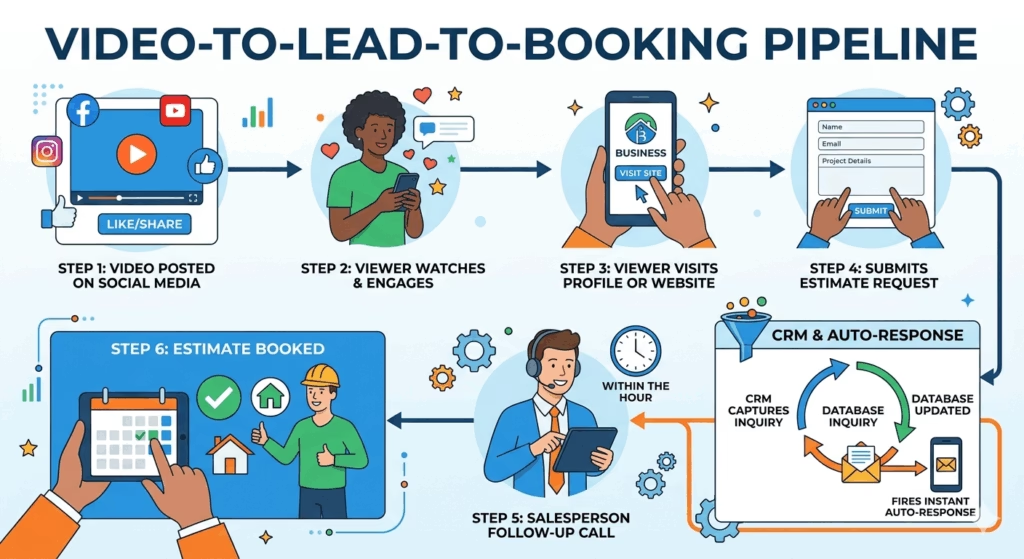
Producing video is only half the equation. The other half is ensuring that the interest video generates converts into actual business.
A homeowner who watches your before-and-after reveal on Facebook, is impressed, clicks your page, and finds no clear way to contact you that’s a warm lead that dissipates. They move on. The video did its job and the landing experience didn’t.
Every video post should have a clear next step in the caption: “We’re booking [service] estimates for [season] call us at [number] or visit [website] to request yours.”
Every platform profile that hosts your video should have a prominent CTA, a visible phone number, and a direct link to your estimate request page or Google Business Profile.
And when those inquiries arrive from a Facebook DM, a website form submission, a call that mentions a video they saw they need to be captured, responded to immediately, and followed up on through a structured sequence. A CRM built for construction and roofing businesses connects your social media inquiries to the same pipeline as your website leads and Google leads ensuring no warm prospect generated by your video content falls through the cracks because nobody saw the message in time.
Video generates awareness and interest. Infrastructure converts it into revenue.
A 30-Day Contractor Video Launch Plan
You don’t need a production schedule. You need a start.
Week 1 — Setup:
- Download Capcut on your phone and spend 20 minutes learning the basic trim and text functions
- Buy a $20 phone tripod and put it in your work vehicle
- Film one “before” condition on your current job (even if you never post it just practice)
Week 2 — First Post:
- Film a full before-during-after sequence on your next project
- Edit it minimally (trim the beginning and end, add a text overlay with your company name and service type)
- Post it to Facebook with a three-sentence caption and a location tag
- Post the vertical version as an Instagram Reel
Week 3 — Second Format:
- Film a 45-second “did you know” educational tip stand near materials on the job site, talk for 45 seconds about one thing buyers should know
- Post it to Facebook and Instagram Reels
- Upload it to YouTube with a search-optimized title and description
Week 4 — Systemize:
- Add “film before + after” to your job completion checklist so it becomes a non-negotiable step
- Set a weekly reminder on your phone to post one video per week
- Review the analytics on your first three videos which format got the most reach? Most engagement? Double down on that format in Month 2
A social media management strategy for contractors incorporates video as a core content type within the broader content calendar so video content production integrates with your Facebook, Instagram, and Google presence rather than running as a separate, standalone effort.
The Bottom Line
You don’t need to be comfortable on camera. You don’t need a production team. You don’t need a weekly upload schedule. You need a smartphone, a tripod that costs less than a lunch, and the habit of filming three short clips at every job you complete.
The contractors generating leads from video right now aren’t the most polished. They’re the most consistent. Their pages have 30 project videos and 40 Reels, none of them perfect, all of them authentic, and the accumulated library of real work performed in real neighborhoods is doing more trust-building than any polished commercial ever could.
Start this week. Film the before shot on your current job. The before is already there. You’re already standing next to it.
Everything else builds from that one clip.
Why Schedule a Call?
Popular Insights

Email Marketing for Contractors: The 5 Campaigns That Actually Bring Back Past Customers
Sep. 11, 2026
What a Roofing Website Should Cost in 2026 (And What You Actually Get for the Money)
Sep. 04, 2026
Spring Marketing Surge: How Roofing and Construction Companies Should Prepare Their Ads Before Peak Season
Aug. 28, 2026
The Shed Dealer’s Digital Playbook: How to Get Found Online and Fill Your Lot
Aug. 21, 2026
The Shed Business Owner’s Blueprint for Getting Found on Google
Aug. 14, 2026Topics
Pudgy Squirrel Marketing
Email Marketing for Contractors: The 5 Campaigns That Actually Bring Back Past Customers
Read More
Pudgy Squirrel Marketing
What a Roofing Website Should Cost in 2026 (And What You Actually Get for the Money)
Read More
Pudgy Squirrel Marketing
Spring Marketing Surge: How Roofing and Construction Companies Should Prepare Their Ads Before Peak Season
Read More
Pudgy Squirrel Marketing
The Shed Dealer’s Digital Playbook: How to Get Found Online and Fill Your Lot
Read More
Pudgy Squirrel Marketing
The Shed Business Owner’s Blueprint for Getting Found on Google
Read More
Pudgy Squirrel Marketing
Why Your Roofing Website Gets Traffic But No Phone Calls (And How to Fix It)
Read More

Pudgy Squirrel Marketing
How to Use Video to Book More Jobs as a Roofer or Builder (Even If You Hate Being on Camera)
Read More
Pudgy Squirrel Marketing
The Anatomy of a High-Converting Contractor Website: What Customers Actually Look for Before Calling
Read More